
Sovereign Workplace
You will keep depending on providers. The work is deciding which dependencies to accept, which to reduce, which to prepare to unwind, and where to stop.
 by Phillip Büchler
updated 12 November 2026
For years I was a firm believer in the cloud-based Microsoft 365 workplace, and I bet a good part of my career on it. Digital sovereignty looked like a theoretical exercise that no real organisation could afford.
I’m less sure now. Things we took for granted are being questioned, and I’m still working out what that means for the workplaces I help build. I have nothing useful to add to the geopolitical commentary.1 What I can do is help untangle the Microsoft 365 dependencies most organisations are tied into.
There are generally two views. The closer someone works to the platform, the more inevitable it looks: “We’re on M365, there’s not much we can do.” I’ve said that sentence myself. Further away from the platform, it looks simpler than it is: “We just need to get out of the US cloud.” Neither helps you decide what to do on Monday.
Both views skip the same step. Whichever platform you choose, you’ll keep depending on providers. What you can decide is which of those dependencies you accept, which you reduce, which you prepare to unwind, and where you stop. Running on Microsoft doesn’t mean every process has to run in the Microsoft workplace.
Most Swiss organisations run on Microsoft 365, so that’s the estate this page starts from. It breaks the topic into decisions you can size, sequence and start on. It doesn’t recommend a provider, and it’s not about geopolitics. The decisions stay with you.
Four dependencies
You depend on a provider in four ways. Each is a separate problem.
Per sensitivity level, in the estate you have
The provider can read it
Provider staff or a foreign authority could reach your content.
Lever: own keys, data placement
The provider holds the only usable copy
If the service goes, your data goes with it.
Lever: independent backup and archive
Touch how the whole workplace runs
The provider must operate it
It works only while they keep running it for you.
Lever: local or partner operation, a second channel
You can't work without their technology
Even if someone else ran it, it would still be their software.
Lever: substitution, open standards
The left pair is usually the cheaper place to start. A measure that reduces one dependency can leave the others untouched.
More in The four dependencies in detail.
Four outcomes
For each dependency that matters, one of four answers fits.
a dependency that matters
Implement
Change the architecture now. The consequence and the cost justify it.
You leave with: a change and its owner
Prepare
Don’t separate yet. Keep the option open and avoid new coupling.
You leave with: a guardrail for new projects, to avoid more coupling
Document
Accept the dependency, and record why.
You leave with: a decision record, an owner, a reason to revisit
Stop
Go no deeper. More independence would cost more than the risk, or duplicate parts of the workplace you have.
You leave with: a stated limit
Four answers, not four levels. Most organisations end up with all of them, for different dependencies and different data.
A decision record can be as light as an Architecture Decision Record.2 Which outcome fits depends on what happens if the dependency fails, whether you can draw a boundary around it, what separating it costs, and what acting now keeps open. How much, and where works through these four questions; How far you can split shows where separation can stop.
The check
One question tests your answers:
You lose access for 30 days because the provider can’t or won’t serve you any more. What still works?
A good answer doesn’t need everything to keep running. It needs you to know in advance which few processes and channels must, and to have tested them. The rest of this page helps you get to that answer, so that the dependencies you live with are decisions rather than accidents.
Why now
The cheapest time to create an alternative is before you need one. Three things usually force the question: a renewal, a regulatory change, or a dependency that turns out to be strategic, such as a critical process that only works on one provider’s platform.
Renewal is the one with a date. It’s when terms, scope and exit clauses can change without breaking anything, and the thinking has to be done before you sign. Most organisations arrive there with the commercial questions prepared and the dependency questions still unasked.
The damage from dependency so far has mostly been about money. In a 2026 study by HSLU and ti&m,3 about 47 of the 200 firms analysed had experienced an incident caused by dependency on a provider. Among them, 61.7% named price increases and only 10.6% loss of control over their data, although data control tops the list of perceived risks. The Microsoft 365 price increase from July 2026 is modest for enterprise plans (roughly +8% for E3 and +5% for E5, more for frontline plans).4 But it lands at renewal, which is when you find out how much room you really have to negotiate. The sovereignty model I use further down, from a study for the digital directors of the French- and Italian-speaking cantons (CLDN),5 has a dimension for exactly this: change control, meaning whether you can decide if and when a new version, licence or price takes effect.
Most organisations can’t size their exit cost today. In the same study, 30 to 45% answered “don’t know” to the questions on investment and price. Working it out now costs a few days. Under pressure it costs far more.
Waiting for a clear signal doesn’t help either. When a market-wide shock comes, everyone moves at once and queues for the same few experts, migration partners and hosting capacity. For example, a study for Digital Public Services Switzerland estimates that only 30 to 80 people in Switzerland have hands-on experience with openDesk.6 How you get there comes back to what that queue means for sequencing.
The federal administration is already building a second track. It finished rolling out Microsoft 365 to about 54,000 workplaces in December 2025.7 In September 2026 the Federal Chancellery started a programme for a fallback workplace for about 3,000 staff in critical processes, next to Microsoft 365.8
The four dependencies in detail
The introduction named the four dependencies. This section shows what each covers, how they overlap, and where the detail behind them comes from.
| Dependency | What it means in practice | Typical lever | CLDN dimensions |
|---|---|---|---|
| The provider can read it | Provider staff or a foreign authority could access your content | Own keys (DKE), data placement | AccessData processingData location |
| The provider holds the only usable copy | If the service goes, your data goes with it | Independent backup and archive, readable without the provider | Data extractionExit strategy |
| The provider must operate it | It works only as long as they keep running it for you | Local or partner operation, a second channel for critical processes | System availabilityChange controlAccessContracts |
| You can’t work without their technology | Even if someone else ran it, it would still be their software | Substitution, open standards | System developmentLegal frameworkExpertise |
The first two are usually the cheaper place to start. Keys and backups can be set up for one class of data at a time, inside the estate you already have, though they still cost something: a key service to run, restore tests, friction for people who work with encrypted documents. The last two get expensive quickly, because they touch how the whole workplace runs.
The four overlap, and they separate control from independence. With Double Key Encryption, Microsoft can’t read the document, but it still runs the service, writes the software and signs in the users who can. You can have control without independence, and independence without a realistic way to replace the provider.
How far you can split shows which parts of the workplace each dependency sits in, using a vendor-neutral workplace capability model with a Microsoft view on top.
Microsoft 365 Local shows how the last two differ. Run disconnected, it moves who operates the service, because Exchange, SharePoint and Skype for Business Server run on infrastructure you own and manage. It doesn’t change whose technology you depend on.9
Reducing the second and fourth dependencies also changes your position at renewal. A provider who knows you could leave negotiates differently.
Where the detail comes from
The four dependencies are my own shorthand. The detail behind them comes from a study by AWK Group for the Conférence latine des directrices et directeurs cantonaux du numérique (CLDN): « Étude d’opportunités pour un cloud souverain » (May 2023).5 It was written for cantonal administrations, but the model works for any organisation.10
The study describes sovereignty along 12 dimensions: the 11 in the table above, plus sustainability, which sits outside the four dependencies. It groups them by the life of a system: building it, using it, retiring it, and a framework around it.
Each dimension has three levels, from 1 (basic requirements) to 3 (full control and autonomy). The study mentions a level 0 for no requirement and leaves it out; I use it as a target for data that needs nothing special, and as a result when a set-up doesn’t even reach level 1.
Level 3 isn’t the goal. In the study’s own options, a service someone else runs stops at level 2 on 9 of the 12 dimensions. Only data processing, data location and access can reach 3 without running it yourself, and only in a service built or adapted for you, with extra effort. So for anything someone else runs, level 2 is the realistic target, and level 3 is an expensive choice for what you decide to run yourself.
For most of your data, that cost isn’t worth it. For a small part of it, it can be: regulated data, or the few secrets that would seriously damage the company if they leaked and that are worth something to an attacker. For those, the level 3 that matters is mostly about who can read the data. That’s the one exception to running it yourself: a service built or adapted for you can get there. Those don’t have to live on the same platform at the same level as everything else. Telling them apart is the next step: how much, and where.
The study is also honest about the cost. More sovereignty means more of your own effort, including for security. Large cloud providers invest far more in security than most organisations can, and hosting in Switzerland improves your legal position, not your technical security.
How much, and where
Two things decide how far to go: what’s at stake, and four questions about what you can realistically do. Levels then measure how far a change gets you.
What’s at stake
Sensitivity
I use four levels. Your organisation probably has its own names for them.
- Public information: press releases, published reports, the website
- General internal: most day-to-day work
- Company confidential: strategy, contracts, HR, anything that would hurt if it leaked
- Regulated: data where the rules come from outside the company, such as banking secrecy, FINMA requirements or health data
Sensitivity mostly drives the first dependency: who can read it. The higher the level, the more it matters who holds the keys and where the data sits.
Criticality
A process can handle only internal data and still be critical, for example crisis communication or payment approvals. Criticality raises the stakes; it doesn’t pick the answer. For a critical process the map targets level 2 for system availability, change control and exit strategy, plus a second channel that people have practised in an exercise. That target is my assumption, not a rule from the study.
What changes the stakes, and what tests them
Some events raise the level you need. Others test whether your current setup holds. Each one hits a different dependency.
| Trigger | Dependency it hits | Effect |
|---|---|---|
| Compelled disclosure (CLOUD Act) | The provider can read it | Tests your current state |
| Loss of the transfer basis (Swiss-U.S. Data Privacy Framework11) | The provider can read it, legal framework | Raises your target |
| A regulator or supervisor tightens rules (FINMA, privatim) | Mostly “can read it”, per sensitivity level | Raises your target |
| Service denial (sanctions, export controls) | The provider must operate it | Tests your current state |
| Price shock | The provider must operate it (change control), and you can’t work without their technology (exit cost) | Tests your current state; already happening |
I’m not predicting any of these, only showing which dependency each one would hit.
The Day-2 test
The check from the introduction asks what still works after 30 days without the provider. Thirty days is an illustration. In a real exercise, use the disruption tolerance your organisation sets for each critical process.
It isn’t an outage test. Microsoft’s operation is mature and publicly measured: it publishes worldwide uptime per quarter12 and backs a 99.9% SLA financially. For ordinary outages, that record is a reasonable basis for not running availability yourself. It has dips: Q1 2026 came in at 99.526%, the lowest quarter in Microsoft’s published table, before Q2 returned to 99.994% (worldwide, across all workloads).
On Day 2 the provider isn’t working to bring you back. It’s the cause. In June 2026, US export controls led Anthropic to suspend access to two of its AI models for almost three weeks.13 The CLDN study covers only a stable situation and leaves this case out of scope. I come back to it in a separate post, Day 2 without Microsoft.
EU supervisors now treat Microsoft itself as critical: in November 2025 the European Supervisory Authorities designated Microsoft Ireland Operations Limited a critical ICT third-party provider under DORA, which puts it under their direct oversight.14 Switzerland isn’t bound by DORA, and the designation says nothing about any single firm’s risk. I read it as a sign that concentration is on supervisors’ agenda.
Deciding
Four questions pick the outcome for a dependency. None of them is a score.
| Question | What to ask | Where this page helps |
|---|---|---|
| Consequence | What happens if this dependency fails or becomes unacceptable? | The stakes above: sensitivity, criticality, triggers, Day-2 |
| Boundary viability | Can you draw a line around the data, the process or the people, and keep it? | How far you can split |
| Economics | Does what you reduce justify the build, the running cost and the friction for users? | How you get there |
| Optionality | Does acting now keep open a choice you’ll want later, at the next renewal, a regulatory change or an exit? | Why now; How you get there |
Boundary viability has three grades:
- Strong: the process, its people, its data flows and its system of record all sit inside the line.
- Partial: the core data sits inside, but everyday work keeps crossing the line.
- Weak: the information is spread through general knowledge work.
For critical workloads, entanglement is no reason to wait. It grows with every project, so it can be a reason to start earlier.
Consequence and boundary set the starting outcome. A rough guide from my experience, not a formula.
The CLDN levels from The four dependencies in detail don’t define the outcome. They measure how far a chosen change moves each dimension, and whether it reaches the target you set for that sensitivity level.
Try it in the map
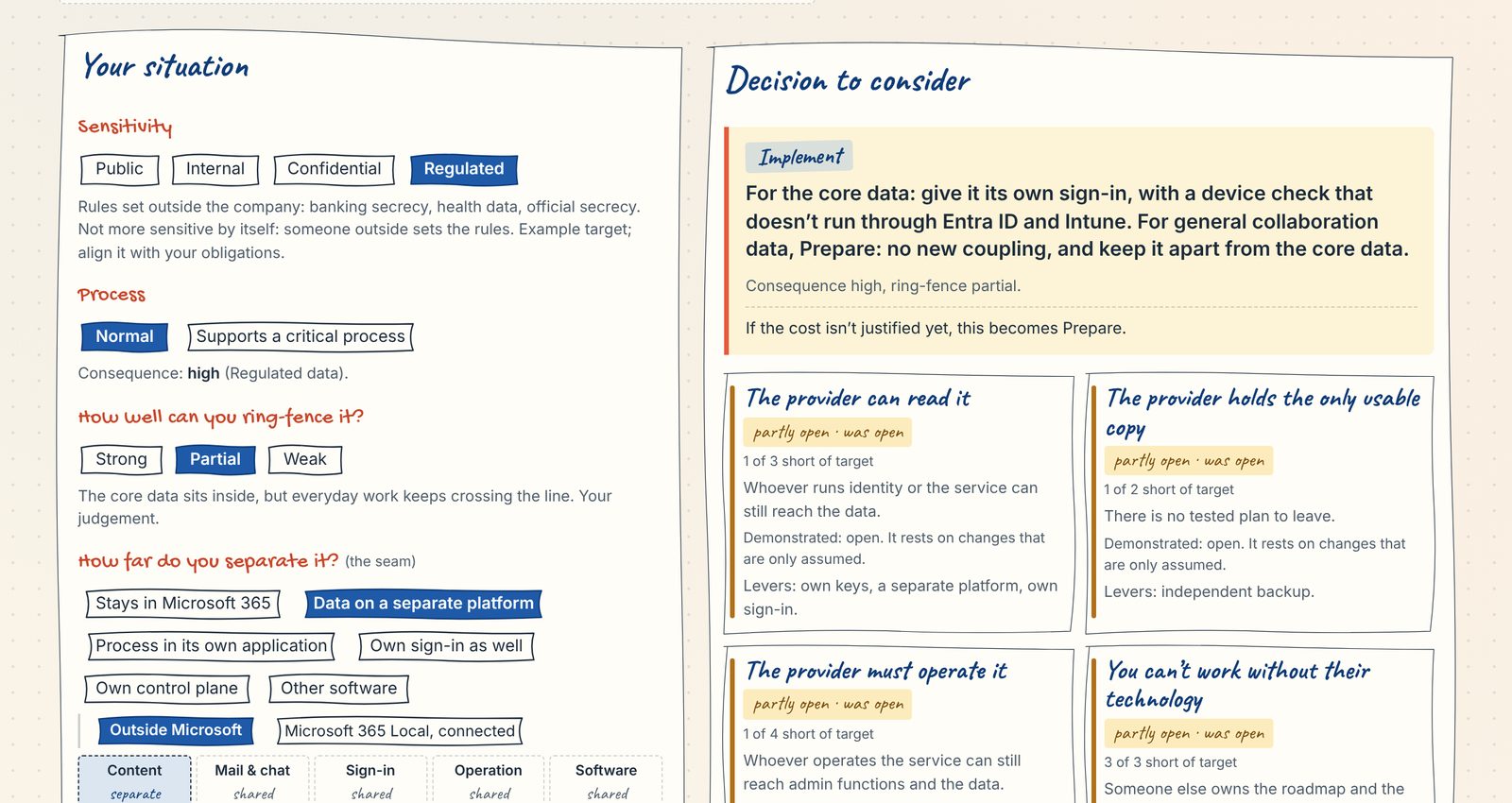
Open the Sovereign Workplace Map. Pick a sensitivity level, whether it supports a critical process and how far you would separate it; for high-stakes data it also asks how well you can ring-fence it. The map gives a decision to consider, the model’s suggestion rather than a conclusion for your organisation, and shows what stays open in each of the four dependencies. It also gives two counts:
- Designed: what your chosen changes would achieve
- Demonstrated: what is configured or tested today
Your choices stay in your browser.
What you can do in the estate you have
Several levers work without leaving Microsoft 365. Each moves different dimensions, none moves all of them, and most combine per sensitivity level. Treat them as options you pick per level, not as stages.
| Lever | What it moves | What it doesn’t move | Where the cost sits |
|---|---|---|---|
| Independent backup and archive | Recovery after deletion, ransomware or a tenant incident. Data extraction and exit, if the copy sits with another operator, under another legal domain, and is readable without Microsoft 365 | Sovereignty, if the copy stays inside the same provider’s control plane: then it’s resilience only | Storage and a restore test you actually run |
| Double Key Encryption (DKE)15 | Confidentiality of labelled documents, including against the provider | Availability and operation. Copilot, search, eDiscovery and DLP can’t see the content; no co-authoring or web opening. Teams chat, meetings and calendar items can’t be protected | Your own key service, and friction for every user who handles those documents |
| Customer Key16 | Control of the root keys; revoking them leads to cryptographic deletion at exit | Provider access during operation: Microsoft holds an availability key, and service code can fall back to it | Key management; little user impact |
| Data placement per sensitivity level | Most dimensions for the data you move out | Identity and device trust, unless you separate them as well (see How far you can split) | A second store, the seam between the two, and training for the people who work in it |
| Microsoft 365 Local9 | Data location and who operates the service, if you run it disconnected. Connected, Azure stays the control plane for the infrastructure | Microsoft as software supplier: it runs the same Exchange and SharePoint Server products as on-premises, with Microsoft’s lifecycle, licences and updates. Most cloud features are gone | Your own hardware and operation, through an authorised partner |
| Advanced Data Residency17 | Contractual data location in Switzerland for services beyond the core, such as Defender for Office 365, Office for the web and parts of Purview. Exchange, SharePoint, OneDrive, Teams and Microsoft 365 Copilot are already committed for a Swiss tenant | Data in processing, access, availability, the technology. It covers the whole tenant, so it can’t be applied to one sensitivity level | An add-on licence for every paid user |
| Second channel for critical communication | Readiness for the Day-2 case in critical processes | The availability score, which rates one system at a time; the day-to-day dependency | Mostly organisational: who switches, the contact lists, the exercises |
Keys move less than they seem to. The DKE key service releases the key to whoever Entra ID authorises. Unless the key service is also reachable only through a path you control, the map scores access at 1. Level 3 for access needs a service built or adapted for you plus an access path you control, or running it yourself.
Two smaller levers are worth a line each: an independent copy of audit and security logs, so you have evidence after an incident without the tenant; and exit readiness (an inventory, tested exports, a written plan).
I leave Customer Lockbox out of the table. It lets you approve Microsoft engineers’ access in routine support cases. That’s useful comfort in normal operation, but I haven’t seen evidence that it changes anything when access is legally compelled.
None of these levers touches identity. Entra ID still decides who signs in to everything, including a separate store whose sign-in or device check runs through Microsoft. That’s the ceiling the next section is about.
In the map above, pick a sensitivity level, how far you separate it and what you add, and the four tiles show which dependencies stay open. Its workshop view shows which lever raised which dimension, and the plan across all four levels.
How far you can split
Content can be split per sensitivity level. The control plane doesn’t split cheaply. You can separate parts of it, but each part you separate is one you now run yourself, and federation keeps the original operator in the path. That’s the ceiling of any partial exit, and it’s why partial sovereignty usually means sovereign content on a control plane you don’t control.
Separation can stop at five seams. Each is a place where you can stop. A deeper seam separates more of the workplace for the part you carve out, but it doesn’t rank higher, and it isn’t always more expensive.
Take client data as the example. The same works for any data you decide to treat separately.
| Seam | What you get | What you still depend on | What it costs you |
|---|---|---|---|
| Data (a store outside Microsoft 365) | Client data no longer lives only with the provider, and the provider can’t open it directly. It can still sign people in to it. Only usable copy; partly: can read it | Sign-in, the device check, and the mail and chat around the client data | A second store, DLP at the seam, records and discovery across two systems, training for the people who use it |
| Process (a case or line-of-business system carries the process; no mail or Teams for it) | The client case and the talk about it leave mail and chat, so they no longer ride on the general workplace. No single dependency | Identity and device management; the general workplace for everything else | Process redesign, integrations, client communication outside mail, support for a second user surface |
| Access path (sign-in and device check not anchored in Entra ID and Intune alone) | The provider can no longer sign anyone in to the client data. Can read it; partly: must operate it | The control plane and software for the rest of the workplace, and now your own access path | A second access path to run: joiners and leavers, MFA, recovery, support |
| Control plane (Microsoft 365 Local, disconnected; a separate VDI for the people who handle client data) | Work on client data keeps running if the provider stops serving you. Must operate it | The vendor’s software, licences and updates | You run identity, servers or VDI and the security stack; most cloud features are gone |
| Technology (an open-source estate, self-operated or Swiss-hosted) | You no longer need the vendor’s software for client data. Their technology | A new supplier, and your own expertise | Both cost lines at their highest: retraining and rebuild; scarce skills |
Where to stop is the decision from How much, and where. The grid there gives the outcome, and the seam says how far it reaches.
The workplace capability model shows the same split per capability. Pick a sensitivity level and each capability shows what you’d do for it: nothing extra, add a control, or separate it. Up to Company confidential, everything stays on one platform with a few controls. Identity stays shared for every level; in the map’s Microsoft view, point at Entra ID to see why.
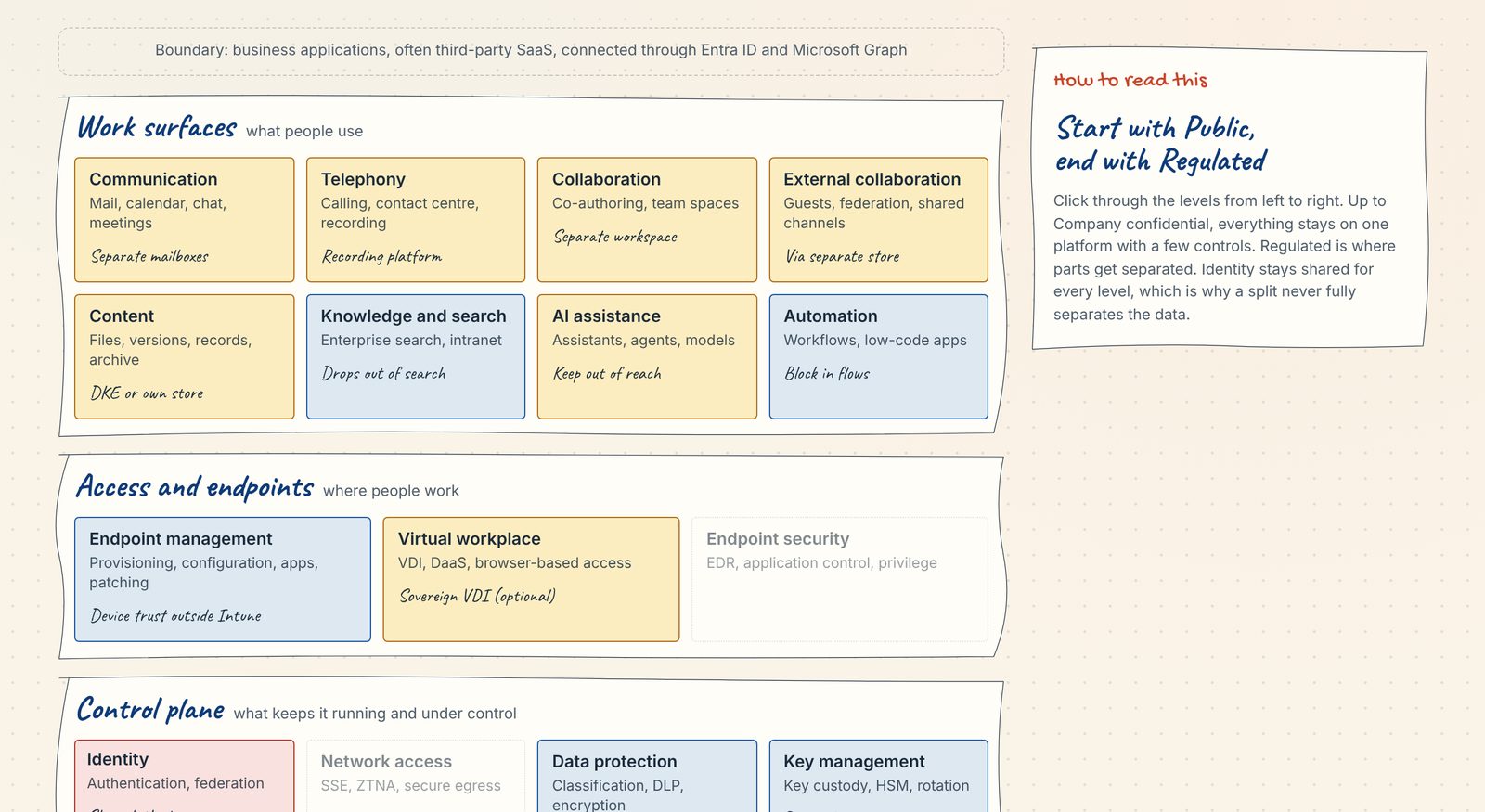
Sensitivity view with Regulated selected. The image opens the interactive page.
What the data seam changes
Take the common case: client data moves to a separate store, and sign-in stays on Entra ID. For that data, the dimensions move like this.
| Effect for the client data | Dimensions |
|---|---|
| Improves | Data location; data processing (Copilot and other Microsoft AI no longer touch it); data extraction |
| Improves partly | Exit strategy (the data has left, the identity exit hasn’t); contracts; legal framework; change control (yes for the store, no for identity); access to system and data |
| Unchanged or worse | System availability: two systems now, and an identity outage locks both |
| Depends on the store or on you | System development (a smaller vendor can be the bigger risk); expertise (often worse at first, because security work moves in-house) |
| Outside the dependency view | Sustainability of the store |
Access improves only partly: whoever runs identity can issue a valid sign-in, and an Intune compliance check puts Microsoft in the path a second time. The access path seam is what closes that.
In the study’s terms, a store built or adapted for you reaches level 2 on processing and location by default, and 3 with extra effort. Access follows the same scale only once sign-in and the device check no longer run through Microsoft, so the map scores the store at 1 for access until you add that access path. Extraction, legal framework and contracts stop at 2.
What resists splitting
External collaboration splits only where you set the platform. Ad-hoc exchange by mail or chat follows whatever your partners use. Structured engagements can come to you: a dedicated VDI silo for an external partner keeps the data, and the DLP, on your side, at the cost of onboarding and support for people you don’t employ.
A counterpoint from the DVS study:6 if your data is classified and stored in open formats, the application layer becomes replaceable. That holds for data extraction and exit. It doesn’t hold for access during operation, where whoever runs identity and the service can still reach the data.
The federal administration draws this line in its own rollout. Its decision paper on data classes in Microsoft 36518 allows INTERNAL data in the cloud, while CONFIDENTIAL data, official secrets and sensitive personal data stay with the local Office apps. That’s a data seam by sensitivity, on a shared control plane.
Stress test: client data in Copilot
AI adds no new dependency, but it tests the boundaries you’ve drawn. Say a project wants Copilot to search and summarise client files. It would save time hunting through cases and speed up first drafts. It also reopens the data seam for that data.
Run it through the four questions. What happens if the provider can read client data again? Can Copilot reach part of it, such as pseudonymised extracts, without dissolving the seam? What does the gain save compared with what reopening costs in DLP rules, access reviews and audit? And how hard is it to take back once people rely on it?
Each outcome can be the right answer:
- Implement: keep the boundary, and give the project AI on the separated side, for example in the case system.
- Prepare: let Copilot reach pseudonymised extracts only, so the boundary stays and can be tightened later.
- Document: let Copilot in, and record why, who owns the decision, and what would make you revisit it.
- Stop: keep the boundary, and accept that client data goes without AI assistance.
Where prompts are processed is a tenant setting an AI administrator can change at any time (flex routing)19, and I couldn’t find Microsoft documentation that commits to processing inside Switzerland (checked 12 November 2026).
How you get there
Transitions run per sensitivity level rather than as one programme for the whole estate, and most carve-outs that exist today are declared rather than enforced.
Two starting points
Most organisations start from a Microsoft 365 estate. Many start from a mixed one, and then it pays to split what’s left on-premises into two groups: what you keep there on purpose, and what simply hasn’t been migrated yet. The first group is already a carve-out. The second is a decision you haven’t made.
Three ways to cut
The seams in How far you can split say how deep you separate. The cut says what you separate: a platform, a process, or only the identifiers.
| Cut | Example | Who pays | Where it leaks |
|---|---|---|---|
| By platform | A whole service moves elsewhere | Everyone who uses it | Little at the seam; the cost is the full switch |
| By process or team (the process seam) | One team handles client files in a separate store | Only that team | At the seam, every time work crosses it |
| Pseudonymise (identifiers stay out) | Client identifiers are pseudonymised; the key to re-identify them stays in the sovereign system | Few people, mostly at the point of re-identification | In the pseudonymisation itself, if it’s weak |
Much regulated data already sits in business applications. The workplace question is the unstructured rest: mail and documents about clients, deals and cases.
In the regulated workplaces I know, I’d start with a mix. Pseudonymise client data for drafting, so people keep co-authoring. Cut by process for formal records.
Pick cuts you can ring-fence (see How much, and where). A label that touches everyone’s daily work gets routed around, and copies drift back. Each cut also needs DLP at its boundary and a named owner.
How mature is the carve-out?
- Declared: a policy says what goes where; users decide at the seam.
- Guided: labels, warnings and an audit trail help them decide.
- Enforced: technical controls block the wrong path at the seam.
- Separated: its own environment and access path. Here the control-plane question from How far you can split comes back.
Most existing carve-outs are probably at the first stage. I’ve seen one up close: a regulated company with most mailboxes in the cloud and process-bound shared mailboxes for client data on-premises. There were few technical measures; users judged what to forward. It gave a clean statement to the regulator, not an enforced state. If a carve-out is meant to reduce your dependency on the provider, I’d treat Enforced as the minimum.
The cost runs on two lines
On the work surfaces, the cost is mostly retraining and scales with the number of people you move. The DVS study estimates four to five days of training per person for a full replacement. On the control plane, the cost is the security stack, identity and integration, and it doesn’t shrink much for a partial exit. The same study finds licence savings largely offset by an own security stack and integration work. Its figures are indicative and come from the public sector.
That’s why a carve-out by team can cost less than it looks: retraining applies only to that team. The control-plane costs don’t shrink with it, and the study’s figures are public-sector estimates, not your business case. It’s also what you give up on every work surface you move: the fact that everyone already knows the tools, and the AI features built into mail, documents and meetings.
The exit view of the capability map shows both costs for each capability. Switch between retraining users and technical rebuild to see where each one sits.
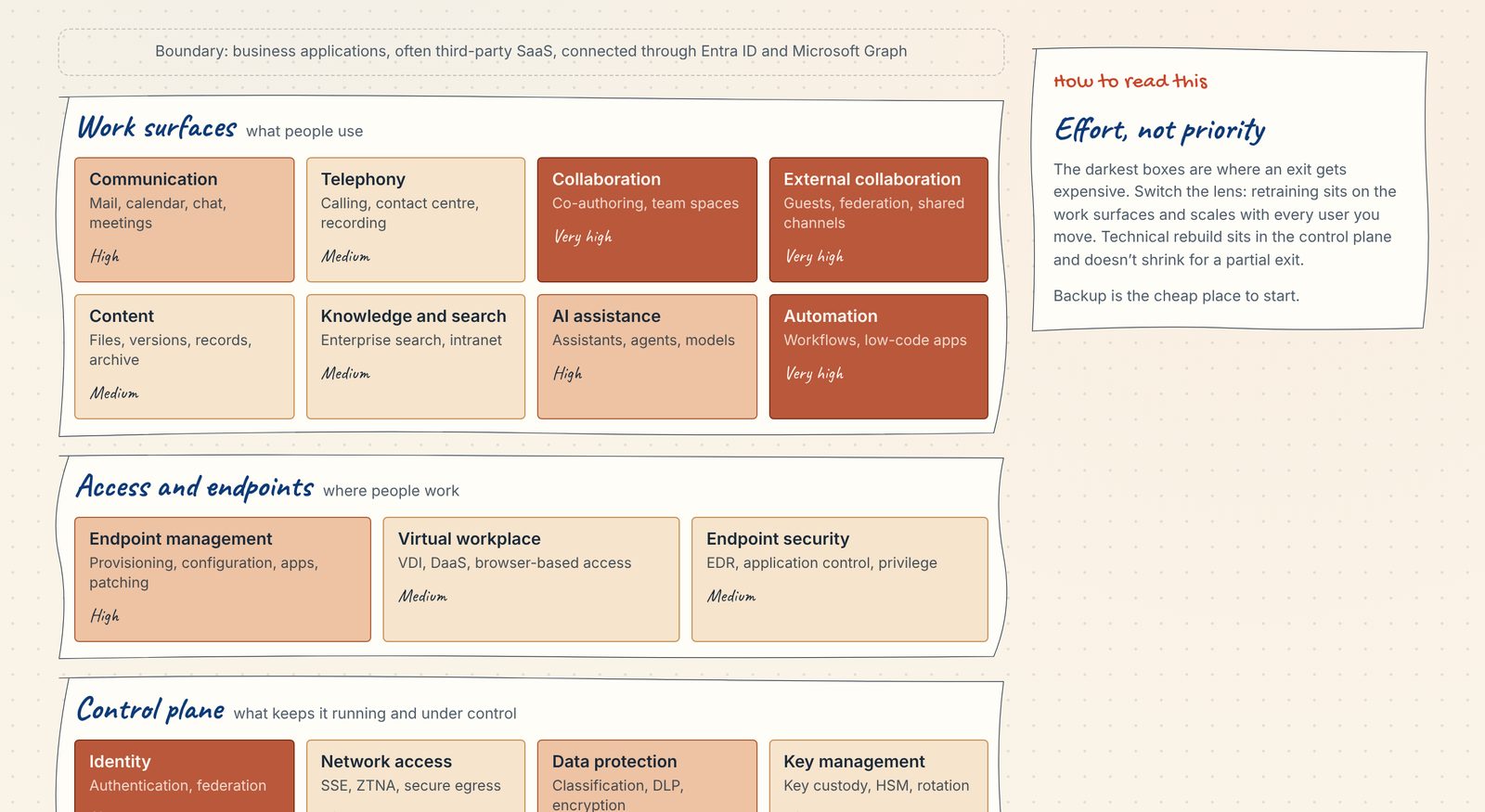
Exit view, overall effort. The interactive page switches between retraining users and technical rebuild.
The DVS study also frames the choice per functional area, and doesn’t rank the options.
Sequence before the dam breaks
Some triggers move the whole market at once: documented compelled disclosure at a Swiss institution, the end of the transfer basis to the US, a supervisor tightening rules for a whole sector. When that happens, everyone moves at the same time and competes for the same few people: openDesk specialists, migration partners, people who can implement a DKE key service, hosting capacity. Price increases and targeted service denial don’t work like that; they hit organisations one at a time, usually at renewal.
That’s the case for Prepare: whoever has done the thinking moves first, even if nothing has been built yet.
How to start
Start with a room, not a document. After the first month you won’t have a programme plan. You’ll have a mandate, a few first decisions, and a qualified basis for estimating what comes next.
I once wrote an exit strategy for Microsoft 365 in a regulated organisation. I wrote it alone, mostly in my head. I should have involved far more people. Like a lot of documents in regulated environments, it met the bar for the audit and no more. That’s why the one document you write alone is only there to get you a sponsor and a room.
Step 1: a strawman to win a sponsor
Half a day, done by you. Pick one critical process and walk it through the capability map with the sensitivity view: which capabilities it uses, which sensitivity levels pass through, where the data actually lives. Then write one page:
- the dependencies you suspect
- three to five draft principles, such as which boundaries should stay intact
- a first guess at the outcome for each dependency that matters
- a plain statement that this is not a plan to leave Microsoft
Take it to someone who can sponsor the topic. It only has to get the room booked, so rough is fine.
Step 2: the room
The room agrees a mandate. The target architecture comes later. Bring architecture, security, legal and privacy, compliance, business continuity and the owners of the critical processes. Agree which dependencies matter, which boundaries should normally stay intact, and who can accept an exception.
Then agree when a project needs an explicit decision. I’d use five triggers. A project:
- crosses a boundary the room decided to protect
- adds a dependency to a critical process
- makes an exit harder
- concentrates more on one provider or control plane
- asks for an exception to an agreed principle
A short Architecture Decision Record is enough; a later post covers what goes in it. Before the room ends, book the Day-2 tabletop.
Step 3: the Day-2 tabletop
Run the Day-2 test as a business continuity exercise, in its own meeting, led by whoever owns business continuity. It tests what the room decided. What to look at:
- The only usable copy: ask for the last restore test. When was it, where did the data go, and could anyone read it without Microsoft 365?
- Who must operate it: who decides to switch to the second channel? Usually that’s the crisis staff lead. Does the channel itself depend on Entra sign-in, provisioning or Intune?
- Who can read it: end with this question. If the provider were compelled to disclose your data, what could be read, and would you know?
The fourth dependency, that you can’t work without their technology, belongs to the renewal decision, not to the tabletop.
If you’re FINMA-regulated, you probably don’t need a new exercise. For banks and insurers, Circular 2018/3 already asks for a contingency plan that keeps an outsourced function running in an emergency (margin no. 25).20 Larger banks (FINMA categories 1 to 3) can run the Day-2 case inside the resilience tests that Circular 2023/1 requires.21 Its footnote on those tests already names the scenario: foreign governments prohibiting foreign-based cloud providers from serving Swiss firms.
What comes out
You come out with inputs for an estimate rather than cost figures: the scope you looked at, the gaps with an owner each, lever candidates sorted by the two cost lines from How you get there, and the unknowns you couldn’t close. Run the Sovereign Workplace Map with what you found.
The risk owner picks an outcome per open dependency: Implement, Prepare, Document or Stop. The map suggests one per sensitivity level; split it where the open dependencies call for different answers. Scoring on the CLDN dimensions stays with architecture. A full rating per dimension adds precision, but it’s too specific to each organisation for this page to provide.
The first assessment
After the first month, a first assessment covers all four sensitivity levels in depth: the critical processes, where the unstructured data lives, the carve-outs that already exist and their stage, and proof that restores work. Leave out a full CLDN scoring, platform evaluation and detailed cost. Use the exit view of the capability map to prepare the renewal.
This is where other methods pick up. Jesko Ziegler’s talk10 proposes a five-step assessment: scoping, target level, current state, gap analysis, then measures and a roadmap. After the first month you have the inputs for its first two steps and part of the third.
Then make it routine
After that, the topic shouldn’t need its own programme. The questions move into decisions you already make: renewals, AI adoption, new SaaS services, process redesign, procurement. Each time, ask whether the change adds a dependency you need, dissolves a boundary the room protected, or meets one of the five triggers. If it meets a trigger, it gets a record.
Sources
- AWK Group for the CLDN, « Étude d’opportunités pour un cloud souverain », 11 May 2023. Tableau 1 (dimensions), Tableau 2 (levels), Tableaux 3–6 (what each type of solution reaches), 4.2 and 5.4.2.
- Eraneos for Digital Public Services Switzerland (DVS), Alternativen zu M365 und Konsequenzen bei einem Wechsel, 18 Sep 2026.
- HSLU and ti&m, Digital Sovereignty Study 2026, 7 Oct 2026 (report behind a registration form).
- Federal Chancellery, Microsoft 365 rollout complete, 18 Dec 2025; programme for a sovereign workplace, 2 Sep 2026; CEBA decision paper on data classes in Microsoft 365.
- FINMA, Circular 2018/3 Outsourcing, 2017 version.
- FINMA, Circular 2023/1 Operational risks and resilience – banks, 7 Dec 2022, in force 1 Jan 2024.
- European Supervisory Authorities, list of designated critical ICT third-party providers under DORA, 18 Nov 2025.
- Microsoft Learn: service health and continuity; DORA; Double Key Encryption; Customer Key availability key; Microsoft 365 Local.
- Microsoft Learn, checked 12 Nov 2026: Data, privacy and security for Microsoft Copilot; Flex routing (EU and EFTA); EU Data Boundary for Microsoft 365; Data residency for Microsoft 365 Copilot.
- Microsoft, Microsoft 365 packaging and pricing updates, 16 Feb 2026.
- Microsoft Learn, checked 6 Nov 2026: Advanced Data Residency.
- Federal Council, Swiss-U.S. Data Privacy Framework, in force since 15 Sep 2024.
- Anthropic, access to Claude Fable 5 and Mythos 5.
- Michael Nygard, Documenting Architecture Decisions, 15 Nov 2011.
- Jesko Ziegler, Cloud und Souveränität – Up- and Downsides, swissICT, Bern, 15 Sep 2026.
Changelog
| Date | Change |
|---|---|
| 12 Nov 2026 | Second version: restructured around four outcomes and five seams; AI product detail left out; map v7. |
| 6 Nov 2026 | First version |
I know, shocker! ↩︎
Michael Nygard, Documenting Architecture Decisions (15 Nov 2011), the post that introduced the format. ↩︎
ti&m and Lucerne University of Applied Sciences and Arts (HSLU), Digital Sovereignty Study 2026, 200 organisations surveyed. Announcement and download (7 Oct 2026; the full study requires registration). ↩︎
Microsoft, Microsoft 365 packaging and pricing updates (16 Feb 2026). USD list prices: E3 $36 → $39, E5 $57 → $60, F1 $2.25 → $3, F3 $8 → $10. Prices vary by country and currency. ↩︎
AWK Group for the CLDN, « Étude d’opportunités pour un cloud souverain » (11 May 2023, French, PDF). ↩︎ ↩︎
Eraneos for Digitale Verwaltung Schweiz, Alternativen zu M365 und Konsequenzen bei einem Wechsel (18 Sep 2026, German, PDF). ↩︎ ↩︎
Federal Chancellery, press release on the completed Microsoft 365 rollout (18 Dec 2025, German). ↩︎
Federal Chancellery, press release on the sovereign workplace programme (2 Sep 2026, German). ↩︎
Microsoft Learn, What is Microsoft 365 Local? ↩︎ ↩︎
I came across the model in Jesko Ziegler’s talk Cloud und Souveränität – Up- and Downsides at the swissICT Fachgruppe Sourcing & Cloud, Bern, 15 Sep 2026. Thanks, Jesko. ↩︎ ↩︎
Federal Council, press release on the Swiss-U.S. Data Privacy Framework (in force since 15 Sep 2024). ↩︎
Microsoft Learn, Service health and continuity, including the quarterly uptime table. ↩︎
Anthropic, statement on the access suspension and restoration. ↩︎
European Supervisory Authorities, list of designated critical ICT third-party providers under DORA (18 Nov 2025, PDF); Microsoft’s summary on Microsoft Learn. ↩︎
Microsoft Learn, Double Key Encryption. ↩︎
Microsoft Learn, Learn about the availability key for Customer Key. ↩︎
Microsoft Learn, Advanced Data Residency overview and data residency offerings by geography, checked 6 Nov 2026. ↩︎
Federal Chancellery, Informationspapier Entscheid CEBA (German, PDF). ↩︎
Microsoft Learn, Flex routing (EU and EFTA), checked 12 Nov 2026. ↩︎
FINMA, Circular 2018/3 Outsourcing, margin no. 25 (2017 version, German, PDF). ↩︎
FINMA, Circular 2023/1 Operational risks and resilience – banks (7 Dec 2022, in force 1 Jan 2024, PDF). ↩︎